WhatsApp vs Team Chat UK 2026
WhatsApp vs Team Chat for Small Business UK 2026 – Which Keeps Your Team Safer?
Written by Calvin Lo | Updated 27 August 2026 | 10 min read | Team Chat
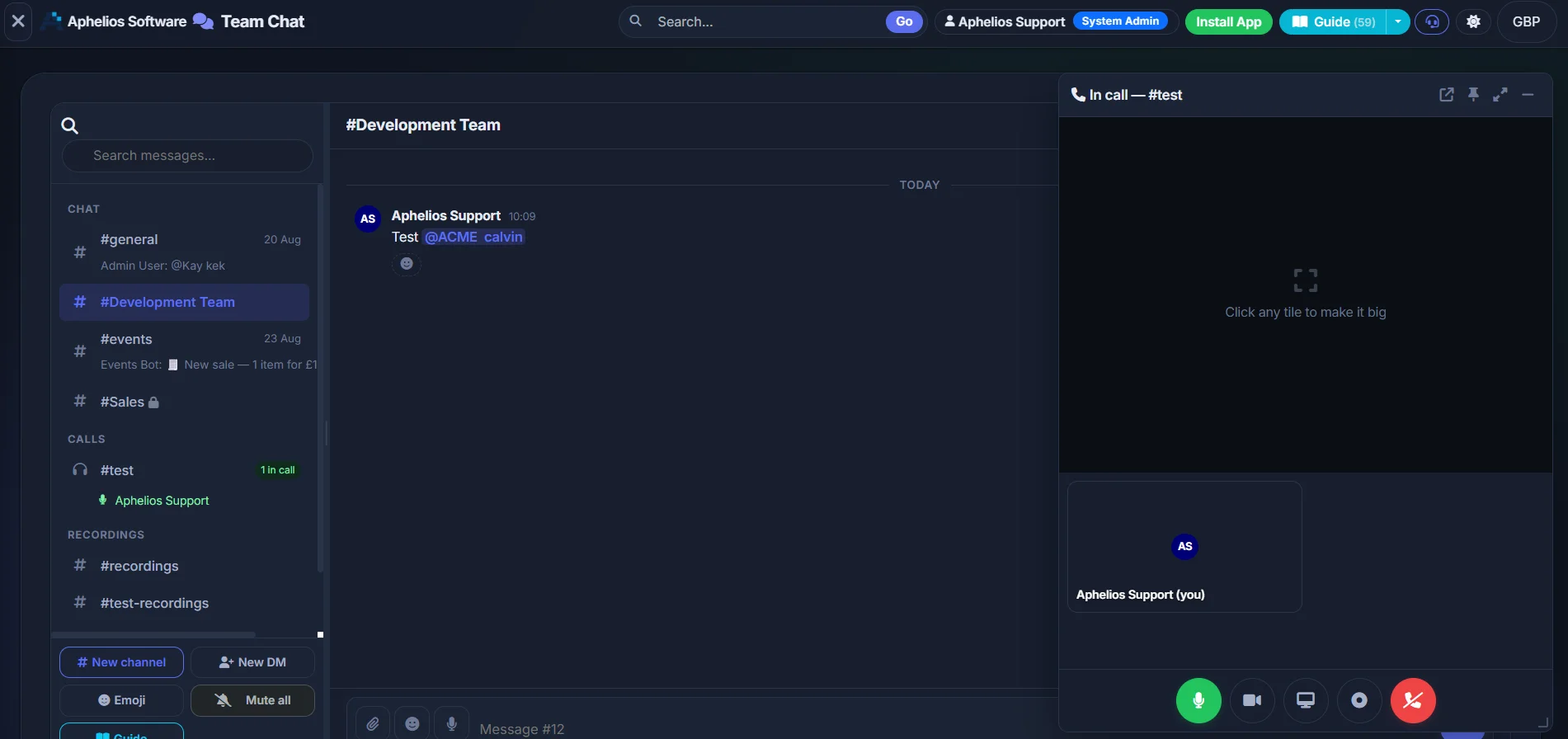
Work chat deserves its own space — not mixed with personal messages. Keep it calm, searchable and business-owned.
If your small business still runs on WhatsApp groups, you’re not alone — but whatsapp vs team chat is a decision that affects privacy, ownership and daily calm. WhatsApp is brilliant for family and friends, and that’s exactly the problem when work lives there too.
Mixing personal and work on the same app means updates get buried under 200-message threads, photos of stock disappear under family photos, leavers keep sensitive history on personal phones, and your team gets pinged at 10pm about tomorrow’s rota. It feels quick at first, then it costs you time, clarity and control.
Team chat gives work its own tidy home — channels for teams or projects and direct messages for quick one-to-ones — so personal chats stay personal and work stays findable. Think of it as the quiet, organised office for messages, sitting right next to your stock, sales and tasks in Aphelios. Here’s a plain-English comparison to help you choose what keeps your team safer in 2026.
Quick takeaway for busy owners:
Use Aphelios Team Chat for anything work-related (rotas, stock, deliveries, issues, files). Keep WhatsApp for friends, family and the odd customer who prefers it — but don’t let work live there. You’ll spend less time scrolling and more time getting things done.
WhatsApp vs Team Chat — Simple Comparison
This table sums up the everyday differences you’ll feel in a shop, café, salon or trade team.
| Area | WhatsApp Groups | Aphelios Team Chat |
|---|---|---|
| Work vs personal | Mixed on personal phones — work pings alongside family chats | ✓ Work separate from personal — calm work account |
| Organisation | One or two noisy groups — stock, rotas and banter all blurred | Channels + DMs — e.g. #rota, #stock, #shop-floor, tidy by topic |
| When someone leaves | Keeps full history, photos and files on personal phone | Business owns the workspace — remove account, history stays secure |
| Finding older messages | Endless scrolling — key updates get lost | Pinned messages + searchable — rotas and prices stay findable |
| Notifications | All-or-nothing — mute one group, miss everything | Channel-level control — get alerts for what matters |
| Best for | Quick personal chats, family, informal updates | Running your business — reliable, owned, organised |
Tip: You don’t need lots of channels to be tidy. Start with 3–4 (e.g. #general, #rota, #stock) and add more only when you need them. See how channels work →
3 Reasons to Keep Work Chat Separate (With Real Small-Business Scenarios)
It sounds like a small change — moving work chat out of WhatsApp — but owners tell us it’s one of the biggest day-to-day wins for calm, clarity and safety. Here are the three reasons, with real examples from UK retail, hospitality and trade teams.
1. Privacy — Stop Leaving Business History on Personal Phones
Scenario: You run a boutique in Manchester. Your Saturday staff group on WhatsApp has six months of chat: supplier prices, delivery photos, staff rotas, customer order screenshots and even a photo of the alarm code someone sent at 6am. One team member leaves for a new job. They still have the entire history on their personal phone — and there’s nothing you can do about it.
With Aphelios Team Chat, conversations are tied to work accounts, not personal numbers. When someone leaves, you remove their work access and the history stays with the business — hosted in the UK and not scattered across ex-staff devices. That’s better for privacy, for GDPR, and for your team’s peace of mind. Personal phones stay personal.
Another common pain: phone-number exposure. WhatsApp needs everyone’s personal mobile number. With team chat, people join via work accounts — ideal if you use seasonal staff, temps or volunteers and don’t want to share personal numbers with everyone.
Benefit you’ll feel: Less risk when staff change, plus clearer boundaries. No more worrying about who still has what on their phone. You control who sees business conversations because the business owns the workspace — learn more about business-owned chat.
2. Tidier, Calmer Chats — Escape the 200-Message Group
Scenario: Your café has one WhatsApp group for everything: “Café Team”. Between 7am and 11am there are 87 messages — a barista asking about oat milk, a delivery driver stuck in traffic, the rota for next week, a meme, three photos of a broken till receipt, and “who’s got the keys?”. The oat milk question gets answered 40 messages too late.
Team chat fixes this with simple channels. Create #front-of-house for service chat, #rota for shifts, #stock-and-deliveries for suppliers, and #manager-only for sensitive updates. Each channel stays on topic, so the right people see the right messages at the right time. Direct messages handle quick one-to-ones without spamming everyone.
Trade example: A two-van plumbing team was using WhatsApp for jobs, parts and invoices. Photos of leaking pipes, boiler serial numbers and customer addresses all lived in one group and were impossible to find a week later. After switching, they used #jobs-today for active callouts, #parts-needed for the supplier run and DMs for “on my way” updates. Jobs went smoother, photos were findable, and customers got faster call-backs.
Tidier chats aren’t just nicer — they mean fewer missed updates, fewer “sorry, I didn’t see it” moments and less after-hours stress. Notifications are channel-based too, so staff can follow #rota closely and mute #general without missing what matters. Explore Aphelios features →
3. Easier to Find and Share — Pin It, Don’t Lose It
Scenario: A gift-shop owner posts the new till prices in WhatsApp on Monday. By Saturday they’ve been buried under 200+ messages and weekend banter. Staff ask the same price question four times. The owner re-sends the photo, which again gets lost. Add in holiday photos and personal chats in the same app and it’s a scroll marathon.
In team chat you pin key updates to the top of a channel — today’s rota, prices, delivery times, health & safety notes — so they never disappear. Files and photos stay with the conversation and are easy to find later. Need last month’s stock photo or a supplier’s delivery note? It’s right there, not three weeks up a WhatsApp scroll.
And because Team Chat lives inside Aphelios alongside your inventory, sales and tasks, you don’t have to flip between five apps. Share a product, link a task or mention stock without leaving the conversation. That’s work chat that actually helps work get done — from £29.99/mo with everything else included. See pricing →
Lost photos are lost time. In WhatsApp, images compress, get auto-saved to camera rolls and vanish in the scroll. In team chat, files stay organised with the channel topic — so that photo of the damaged delivery or the new window display is findable next time you need it.
The Risks of Using WhatsApp for Business (Plain English)
WhatsApp isn’t “bad” — it’s just built for personal life, not running a business. Here are the risks small UK businesses run into most:
1) GDPR and data control headaches
WhatsApp groups live on personal devices and personal numbers. That makes retention, access control and proving who saw what harder. If someone handles customer data (names, addresses, order screenshots) in a WhatsApp group, you have less control over where that data ends up. Team chat is UK-hosted and tied to work accounts, so you can manage who has access and where business data lives. How Aphelios handles business chat →
2) You don’t own the conversation
WhatsApp groups are owned by whoever created them on their personal phone. If that person leaves or loses their phone, admin gets messy. With business-owned team chat, the workspace belongs to your business. Add or remove people in clicks, keep history, and keep admin with the manager — not one person’s SIM.
3) Missed updates and “I didn’t see it”
In a busy WhatsApp group, important messages drown. A price change posted at 9am is 150 messages up by 3pm. Team chat pins and channel organisation keep the important stuff visible. Want everyone to see the new rota? Pin it in #rota — no re-sending needed.
4) After-hours intrusion and burnout
When work and personal share one app, work follows your team home. Evening pings about tomorrow’s shift buzz next to family chats. Team chat creates a healthy boundary: work chat lives in the work space. Staff can check it when they’re on, and switch off when they’re not — without muting their family.
5) File chaos and lost knowledge
Photos, PDFs and delivery notes get compressed, auto-saved to personal galleries and then lost. New starters have no context because history is fragmented across phones. Team chat keeps files with the topic and preserves history in the channel — so new team members get up to speed faster.
None of this means WhatsApp is unsafe for a quick “on my way” — it just means a business needs a place where work history is secure, searchable and owned by the business. That’s what Aphelios Team Chat is built for. Read: Stop using WhatsApp groups →
The Benefits of Team Chat — Calm, Tidy and Business-Owned
Think of team chat as WhatsApp’s calm, organised cousin — designed for work so you don’t have to retrofit a personal app.
- ✓
Channels and DMs keep things tidy
Spin up a channel for any topic — #rota, #stock, #jobs-today, #marketing — and keep one-to-ones in DMs. Less noise, faster answers. Try channels →
- ✓
Pinned messages and file sharing that actually helps
Pin rotas, price lists and key updates to the top. Share photos, PDFs and delivery notes where the work happens — not lost in a scroll.
- ✓
Business-owned, UK-hosted, work accounts
Your workspace belongs to your business, not one person’s phone. Staff join with work accounts, hosted in the UK — simpler for leavers, privacy and GDPR.
- ✓
Right next to stock, sales and tasks
Chat lives alongside inventory, sales and tasks — so you can talk about a product and action it without switching apps. See all features →
- ✓
Notifications that respect boundaries
Follow the channels you need, mute the rest. Work stays responsive in hours and quieter out of hours — without muting family on WhatsApp.
- ✓
Simple to learn, quick to adopt
If your team can use WhatsApp, they can use team chat. Create a channel, add people, start typing — no IT project needed. From £29.99/mo →
Work deserves its own space
Aphelios Team Chat gives you a calm, tidy place for work — channels, DMs, pins and file sharing, all included with your business toolkit.
Explore Team ChatWhen WhatsApp Still Makes Sense
We’re not here to ban WhatsApp. It’s still handy for:
- Quick personal chats with family and friends — keep it for life outside work.
- Customers who prefer it — if a regular wants to message on WhatsApp, that’s fine for customer comms, but copy key details (order, price, delivery date) into your business system or team chat so it’s not lost.
- One-off, non-sensitive updates like “running 5 mins late” between two people — but for anything you’d want to find later, put it in team chat.
Golden rule: if it’s work, put it in team chat. Personal stays on WhatsApp, work stays in Aphelios Team Chat. Your team gets clearer boundaries, and you get a searchable record that the business owns.
How to Move Your Team Gently — Announcement Template + 3-Day Switch
Worried about “another app”? Keep the move light, human and short. Here’s a simple plan that works for teams of 2–20.
Day 0 — Announce it kindly (copy/paste)
Message to send in your current WhatsApp group:
“Hi team — quick update to make work calmer for everyone. From [DATE], we’re moving work chat from WhatsApp to Aphelios Team Chat. It’s like WhatsApp but tidier: we’ll have channels (e.g. #rota, #stock) and DMs, pinned rotas/prices, and work won’t mix with personal chats. You’ll get an invite today — it takes 2 minutes. WhatsApp stays for personal/family chat. Thanks for helping us keep work easy to find! Any questions, pop them in #general once you’re in.”
Day 1 — Set up 3–4 channels and invite
- Create #general (announcements), #rota (shifts), #stock or #jobs-today (day-to-day work), and #random or #wins (culture — keep it human).
- Pin the current rota and price list in their channels. Post a welcome message and ask everyone to say hi in #general.
- Share a 1-minute how-to: “Create a channel, send a message, share a file, pin a message.” That’s all most teams need. See how in Team Chat →
Day 2 — Work there, not in WhatsApp
Nudge gently: when someone posts work in WhatsApp, reply “Good shout — popped that in #stock so we don’t lose it” and move the message. Celebrate quick wins — “found the delivery photo in 10 seconds!”
Day 3 — Mute or archive the old group
Don’t delete the WhatsApp group straight away (people get nervous). Mute it and post a final pinned note: “Work chat has moved to Aphelios Team Chat — this group is now archived for personal chat only. See you in #general!” After a week, most teams stop using it for work entirely.
Tip for owners: Link chat to action. When someone says “we’re low on X” in #stock, create a task or check inventory right from Aphelios — no extra app needed. That’s the benefit of an all-in-one toolkit at £29.99/mo.
Cost and Ownership — At a Glance
Free isn’t always cheapest when it costs you time and control. Here’s how the two options compare on cost and ownership for a typical small UK team of 5–10 people.
| Area | Aphelios Team Chat | |
|---|---|---|
| Monthly price | Free (personal app) | From £29.99/mo — includes chat + inventory, sales & tasks |
| Per-user chat fees | None — but no business controls | None — flat business price |
| Who owns the history | Individuals — on personal phones | Your business — UK-hosted workspace |
| Leaver process | Manual — ask them to delete, hope they do | Remove work account — history stays, access gone |
| Search & pins | Scroll to find — often lost | Pinned + topic-based — find rotas/prices instantly |
| Works with your business tools | Separate — copy/paste between apps | Built-in next to stock & tasks — less switching |
Bottom line: if WhatsApp saves you £0 but loses 3 hours a week to scrolling, re-sending and hunting for photos, it’s the expensive option. Team chat from £29.99/mo gives you that time back — with ownership and calm included. Compare plans → or see how we compare to 7 alternatives.
The Bottom Line — Give Work Its Own Space
WhatsApp is wonderful for life outside work. But when rotas, stock, deliveries and customer details live on personal phones in noisy groups, your business pays with lost time, lost files and less control. The safer, calmer choice for 2026 is simple: keep personal on WhatsApp, keep work in a place that’s organised, searchable and business-owned.
Aphelios Team Chat gives your UK small business that space — channels for every topic, DMs for quick questions, pinned messages so nothing gets lost, UK hosting and ownership that stays with you when staff change. And because it sits beside your inventory and tasks, work chat turns into work done.
Ready to make the switch? Explore Team Chat or start your trial today — your team (and their personal WhatsApps) will thank you.
FAQ — WhatsApp vs Team Chat
Should I use WhatsApp for my business team chat?
You can, but most small businesses outgrow it quickly. Work and personal mix on private phones, there are no proper channels, and leavers keep the history. Team chat keeps work separate, tidy and owned by the business — fewer misses, less stress. If you love WhatsApp’s simplicity, you’ll feel at home in Aphelios Team Chat without the downsides.
Is WhatsApp secure and GDPR-friendly for business use?
Messages are encrypted, but “secure for business” also means controlling where business data lives. WhatsApp ties groups to personal numbers and devices, so history stays on personal phones and leavers keep it. Team chat is UK-hosted and tied to work accounts, so you control access and retention — simpler for GDPR and peace of mind.
What happens to chat history when someone leaves?
On WhatsApp, they keep everything — photos, files and customer details — on their phone. In Aphelios, the business owns the workspace. You remove their work account and the history stays securely with the business, not on personal devices. That’s better for privacy and continuity.
Will my team actually switch from WhatsApp?
Yes — keep it simple and kind. Announce a switch date, set up 3–4 channels for the topics you already discuss, pin the rota and prices, and guide people for 2–3 days. Most teams settle quickly because team chat feels familiar but calmer than a noisy 200-message group. Use the announcement template above to make it easy.
Is team chat hard to learn if we already use WhatsApp?
Not at all. If you can use WhatsApp, you can use team chat — create a channel, add people and start messaging. Share files, pin key updates and use DMs for quick questions. It’s all next to your stock and tasks too, so there’s less app-switching. See how it fits together →
How much does team chat cost compared to WhatsApp?
WhatsApp is free for personal use but costs you in lost time, missed updates and no ownership. Aphelios Team Chat is included from £29.99/month with inventory, sales and tasks — one tidy, UK-hosted toolkit with no per-user chat fees. View pricing or try Team Chat →
Related Guides
Keep exploring — make work chat calm, safe and connected to the rest of your business.
Keep Work and Personal Separate — From £29.99/mo
Aphelios Team Chat is the calm, business-owned home for work — channels, DMs, pins and file sharing, right next to your stock and tasks.
UK-hosted • Business-owned • Simple to learn • Try it free
Start Free Trial